Let customers pick a delivery slot in your app
Shopify’s own local delivery sets zones by postal code or radius, plus fees and minimum orders. It doesn’t let customers pick a delivery day or time slot. MobiVogue puts the slots from Zapiet or Pickeasy in your app’s cart, and sends a push as each order goes out, for stores that deliver in their own area.
Who it’s for
Stores that deliver in their own area: grocery, bakery, fresh food, milk rounds, and pet or coffee shops with a home city.
What Shopify does, and what the app adds
Shopify handles where and how much. The app adds when.
Delivery zones, fees and minimums are already free in Shopify, so the app doesn’t redo them. What Shopify can’t do is let customers choose a day and time, and that’s the part a delivery store needs most. See how it fits grocery stores and food brands and bakeries.
| Job | Shopify on its own | With the MobiVogue app |
|---|---|---|
| Delivery area by postal code or radius | Yes: up to 10 zones per location, 100 miles (160 km) at most | Uses your Shopify zones as they are |
| Delivery fee, free delivery, minimum order | Yes, per zone | Uses your Shopify fees and minimums |
| Customer picks a delivery day and time slot | No. Shopify shows estimated dates for shipping only | Yes, in the app’s cart, from your slot app |
| Order limit per slot, cut-offs, blocked dates | No | Yes, as set in your slot app, shared with your website |
| Date picker inside checkout | Shopify Plus only | Not needed: the slot is chosen in the cart, on any Shopify plan |
| “Out for delivery” message | No; local orders have no carrier tracking | A push when you or your routing app mark it |
| “Delivered” message | An email when you mark it delivered | A push as well |
Shopify cells: setting up local delivery, fulfilling local delivery orders, delivery dates and the checkout date picker.
How it works in the app
From pin to doorstep, in your app.
- 1
Drop a pin
The customer confirms their address on a map, which helps where addresses have no postcode. Shopify decides whether it’s in a zone.
- 2
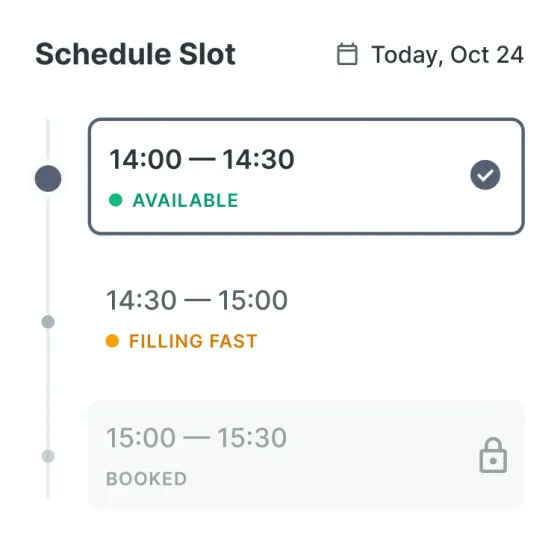
Pick a slot
Available days and times come live from your Zapiet or Pickeasy setup, in the cart, before checkout.
- 3
Check out
Shopify’s own checkout, with your local delivery fee and minimum. Express wallet buttons are hidden so local delivery stays available.
- 4
The slot is on the order
Saved in your slot app’s own format, so it shows in Shopify and in the slot app as if booked on your website.
- 5
Status pushes
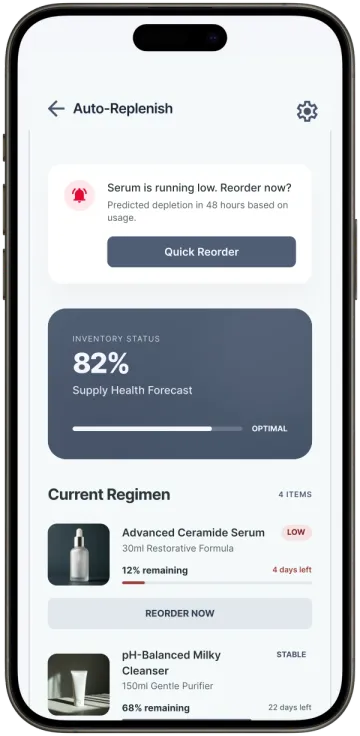
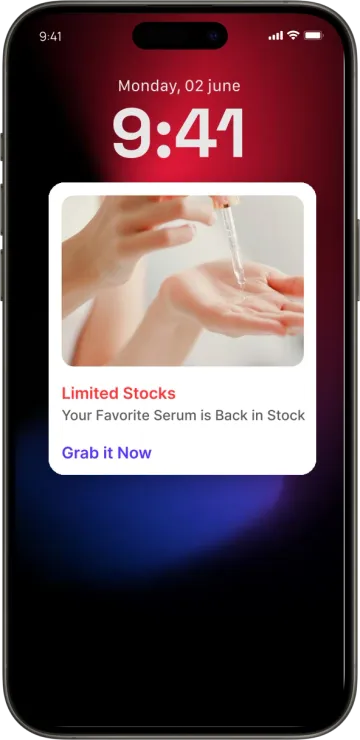
Ready for delivery, out for delivery and delivered, each as a push from your app.
Order details follow Zapiet’s documented note attributes (Zapiet docs).
Works with your delivery app
Keep the slot app you already use.
Merchants have asked for an app builder that works with their delivery-date app since January 2024; one tried three builders and none showed their Zapiet setup (Shopify Community). Zapiet itself lists Tapcart, Shopney, Vajro and Shop2app as not compatible (Zapiet).
MobiVogue reads the slots from the app you already run and books into it. So your website and your app share one booking count, and a slot can’t be filled twice from two places. Slot limits are a long-standing ask from delivery stores (Shopify Community).
- Works in the app
Delivery and pickup slots, order limits and cut-offs.
- Works in the app
Date and time slots with order limits, cut-offs and blocked dates.
-
Using another slot app?
Tell us which one, such as Bird, Stellar or Buunto, so we know which to add next. Routing apps such as EasyRoutes or Onfleet keep planning your routes alongside the app.
Examples
Delivery that brings the next order back.
 Grocery and fresh food
A weekly basket on a Saturday morning slot. Next week, one-tap reorder brings the same basket back, and the customer picks a new slot in the cart.
 Bakery and milk rounds
Fixed delivery days with a cut-off the evening before, so the bakery knows the next morning’s orders. Each slot stops taking orders at its limit.
 Pet food
A 12 kg bag on an evening slot, so someone’s home to carry it in. A refill reminder lands before the next bag is due.
 Coffee roasters
A city round on Tuesdays and Fridays for local customers, while everyone else gets shipping as usual.
Every example ends in a repeat order: one-tap reorder brings the basket back, and refill reminders land before the next one is due.
Settings
What it uses.
- Zones, fees and minimums
- From Shopify’s local delivery settings, so there’s one set of zones for your app and website.
- Slots, limits and cut-offs
- From your Zapiet or Pickeasy setup, with one booking count for the app and your website.
- When the slot is chosen
- In the cart, before checkout. To change it later, the customer contacts your store.
- Pickup
- Shopify’s own pickup at checkout, with pickup slots from the same slot app.
- Express wallets
- Apple Pay, Google Pay and PayPal buttons are hidden when a delivery slot is chosen, because Shopify drops local delivery when they’re used. Shop Pay still works.
- One location per order
- Shopify needs one location with stock for the whole order. Shopify picks it.
- Speed
- Set by your team. The app only offers the slots you set.
Express wallets and one location per order: Shopify Help Center.
FAQ
Local delivery: questions merchants ask.
Can’t find yours? Ask it on a 30-minute fit call. You’ll talk to the team that builds the app.
Book a fit callShopify’s local delivery
Can customers choose a delivery date or time slot on Shopify?
Not natively. Shopify shows estimated dates for shipping, but choosing a delivery day or slot needs an app (Shopify Help Center). In a MobiVogue app, customers choose in the cart, from your Zapiet or Pickeasy slots.
Why isn’t the local delivery option showing at checkout?
Usually one of four reasons: the customer used Apple Pay, Google Pay, Amazon Pay or PayPal; Google couldn’t verify the address; the order is under the zone’s minimum; or no single location stocks the whole order (Shopify Help Center).
What’s the maximum local delivery radius on Shopify?
100 miles or 160 km, with up to 10 delivery zones per location (Shopify Help Center).
Do I need Shopify Plus?
Not for this. Shopify Plus is needed for date pickers inside checkout (shopify.dev). In the app, the slot is chosen in the cart, so it works on any Shopify plan.
In the app
Do delivery date apps like Zapiet work in a mobile app?
Often not: Zapiet lists Tapcart, Shopney, Vajro and Shop2app as not compatible (Zapiet, October 2026), and merchants have asked for a builder that works with them since January 2024 (Shopify Community). In MobiVogue apps, Zapiet and Pickeasy slots work in the cart.
Can I limit how many orders each slot takes?
Yes, with the order limits in Zapiet or Pickeasy. The app and your website book against the same count, so a slot can’t be double-booked from two places.
Can customers track a local delivery?
They get a push when the order is ready, out for delivery and delivered. Shopify itself sends no “out for delivery” message for local orders, because they have no carrier tracking (Shopify Help Center). There’s no live driver map.
How fast will orders arrive?
That depends on your team. The app offers only the slots you set, so it never promises a time you can’t keep.
Related features
Works well with.
Payback check
See if an app pays back for your brand.
Put in your orders, repeat rate and order value. Get an honest answer in two minutes, even if it’s “not yet”.
Or book a 30-minute fit call →